Workflows
Every automation in your new back office, in plain language: what it does, when it runs, what it sends, and what switches it on.
- The whole system
- Webinar
- Sales and buyers
- Leads and keywords
- Skool members
- Safety and running
- Held and retired
The whole system
Your tools on the left feed the automations in the middle. The automations keep your contacts, orders and webinar records in one place, and every text and email goes out through one pair of senders that check consent, quiet hours and daily limits first. The number beside each automation is how many of your old GoHighLevel workflows it replaces.
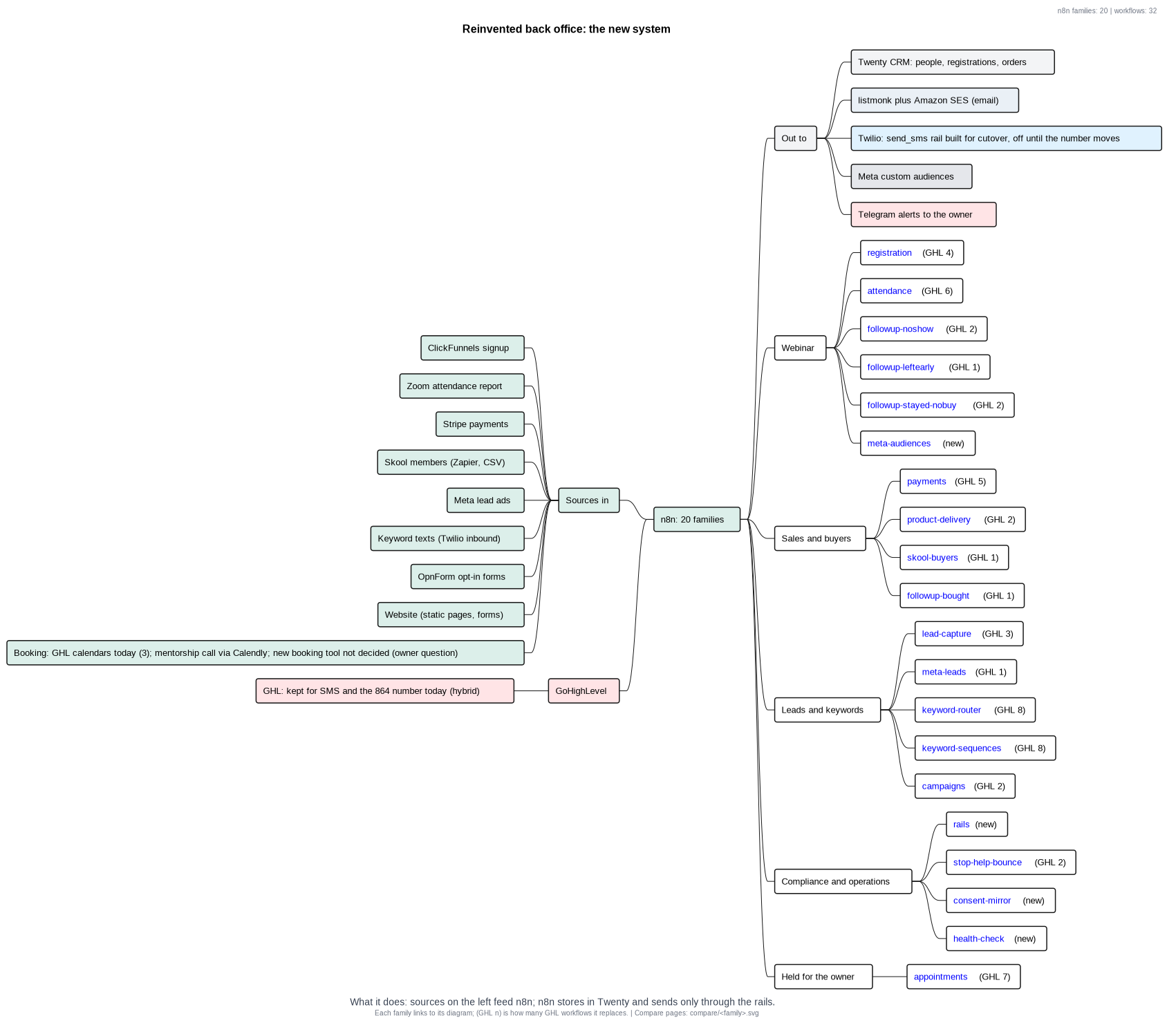
Every automation below is built and tested. Today they all run in quiet mode on our managed host: they read, decide and write down what they would send, and send nothing. Where the wording of a message still needs a fact from you, it says so below. That wording waits on your sign-off and does not go out until then.
Webinar
From the sign-up to the follow-up for each pool.
-
Sign-ups and reminders
Takes each webinar sign-up, adds the person to your contacts and to the Zoom webinar, confirms by text and email, then sends the reminders.
- When it runs
- The moment someone signs up. Reminders go the day before, 3 hours before, 1 hour before and 10 minutes before, plus a "we're live" note 5 minutes after the start.
- What it sends
- The confirmation and the reminders, by email, and by text to people who agreed to texts. Wording waits on your sign-off.
- Switched on by
- Your read-only Zoom and ClickFunnels keys for the quiet run, then your go to switch sends on.
- Replaces
- All rebuilt: "1.1 Webinar Registration - V2", "Webinar Registration - 05 Feb 2026", "Webinar Registrations from July 25" and "Weinar Registration (Via ZOOM LINK)".
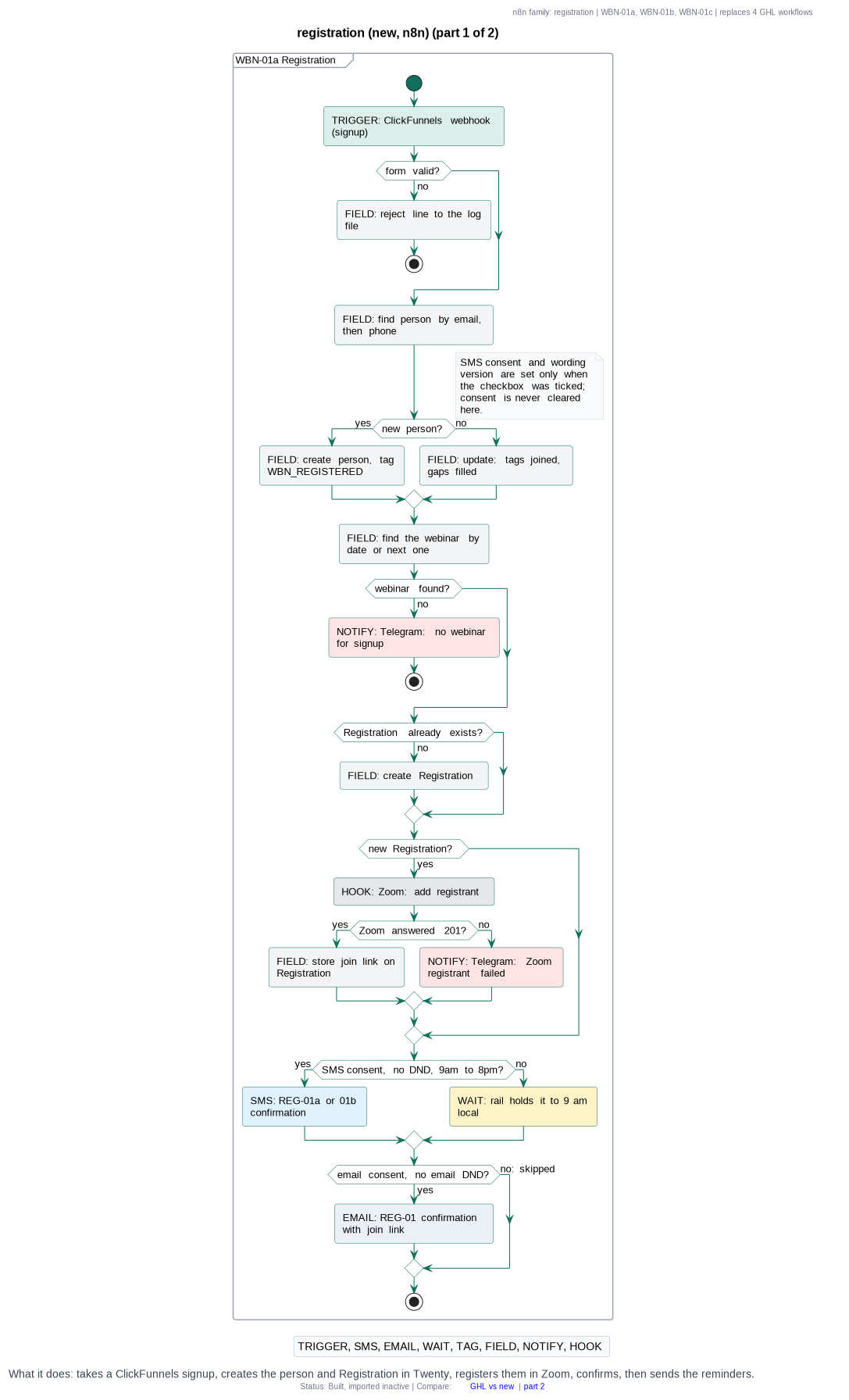
Part 1. Open full size 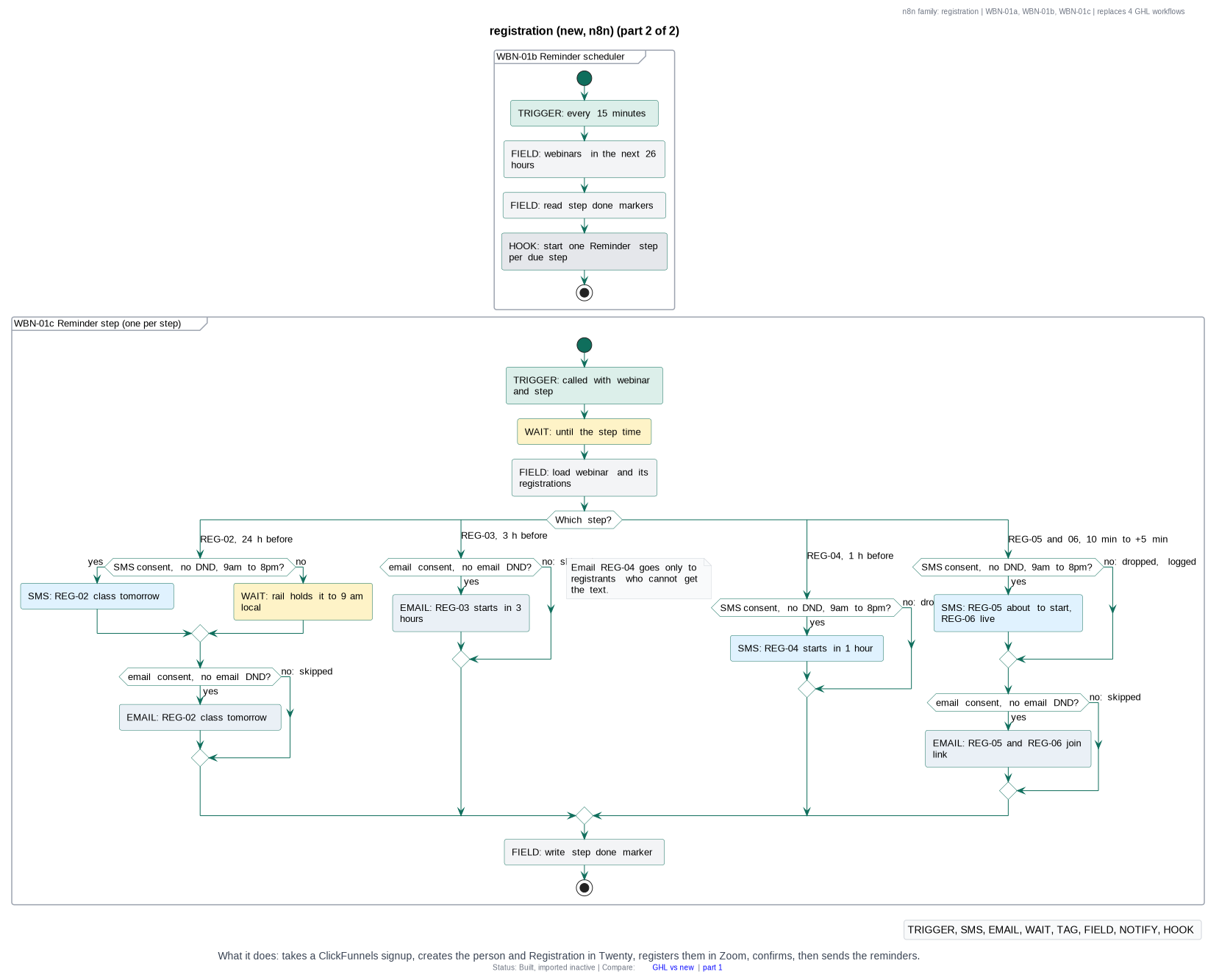
Part 2. Open full size -
Attendance and pools
After each webinar, pulls the real attendance from Zoom, works out how long each person watched, and sorts everyone into a pool: no-show, left early, stayed, or bought.
- When it runs
- It checks every 15 minutes and runs once a webinar has ended, then starts the four follow-ups and updates your Meta audiences.
- What it sends
- Sends nothing to anyone.
- Switched on by
- Your read-only Zoom key.
- Replaces
- Five retired "clicked the link" and view tags ("Webinar Attendees - 05 Feb 2026", "Webinar Attendees - 5 March 2026", "Webinar Attended - From 1st may 25", "Webinaar Attendees All Time" and "Youtube video Views"), because a click is not attendance. Part of "Weinar Registration (Via ZOOM LINK)" is rebuilt here.
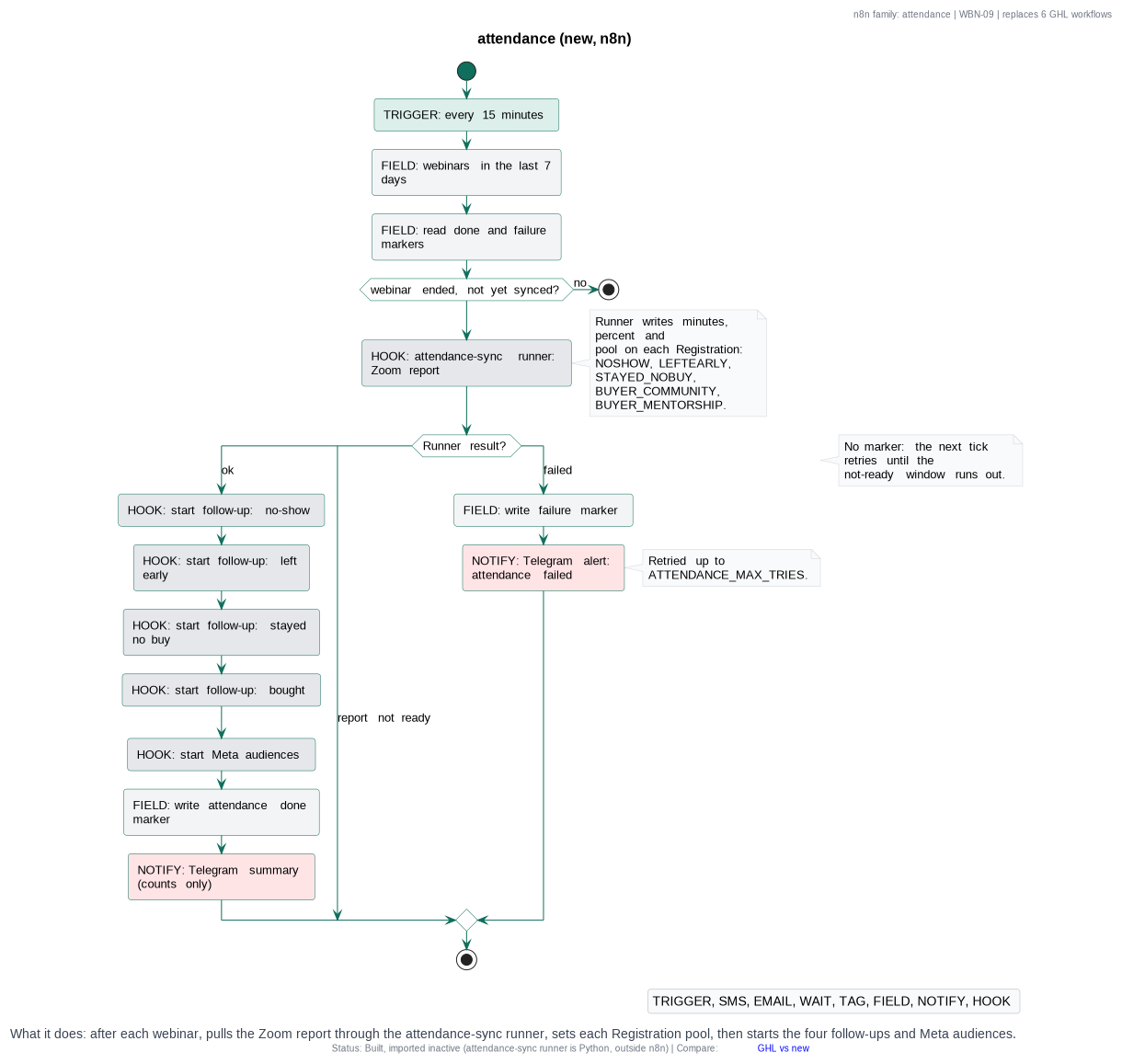
Open full size -
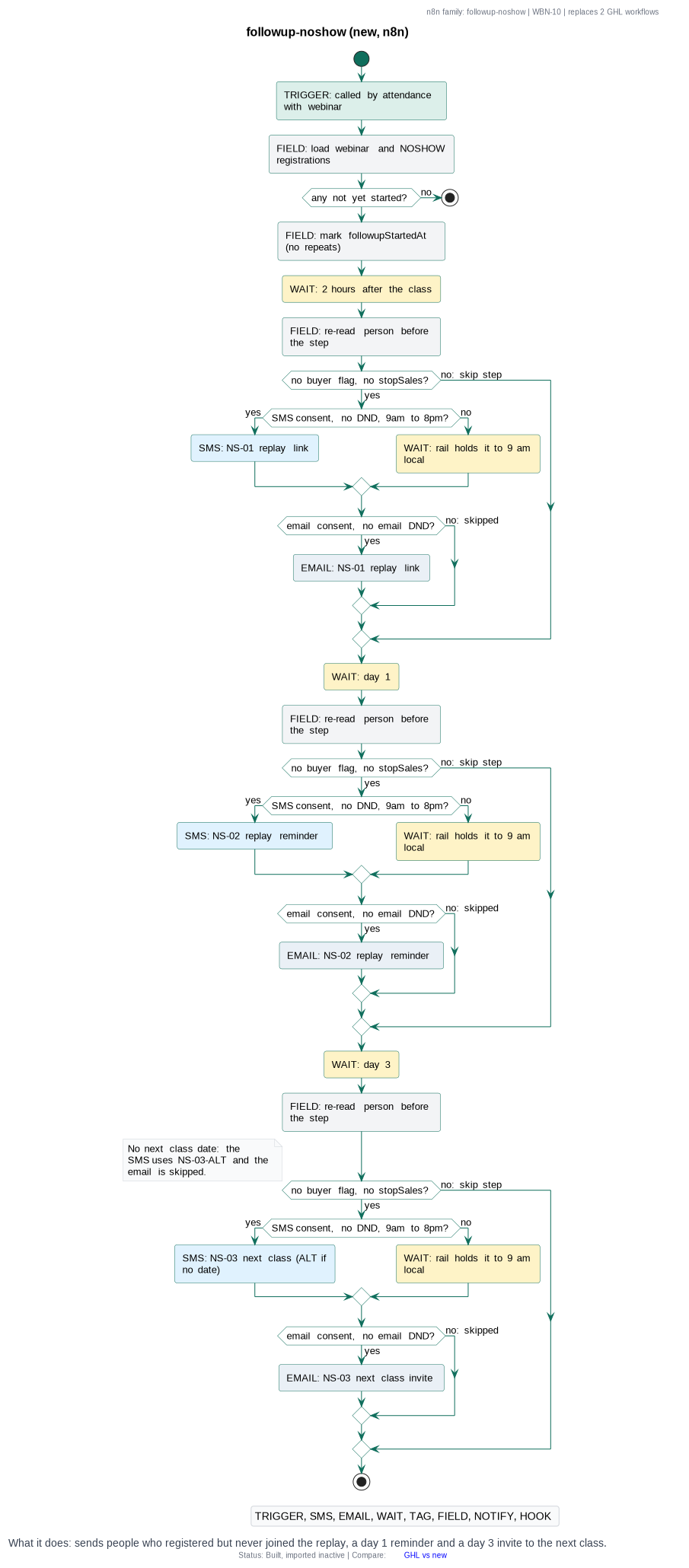
No-show follow-up
Sends people who registered but never joined the replay, a reminder, and an invite to the next class.
- When it runs
- Two hours after the webinar ends, then day 1 and day 3 at 10 am Eastern. It stops the moment the person buys.
- What it sends
- Texts and emails, each only where the person agreed. Wording waits on your sign-off.
- Switched on by
- Your go to switch sends on.
- Replaces
- Both copies of "7. Bride To Webinar Reinvite", rebuilt.
Open full size -
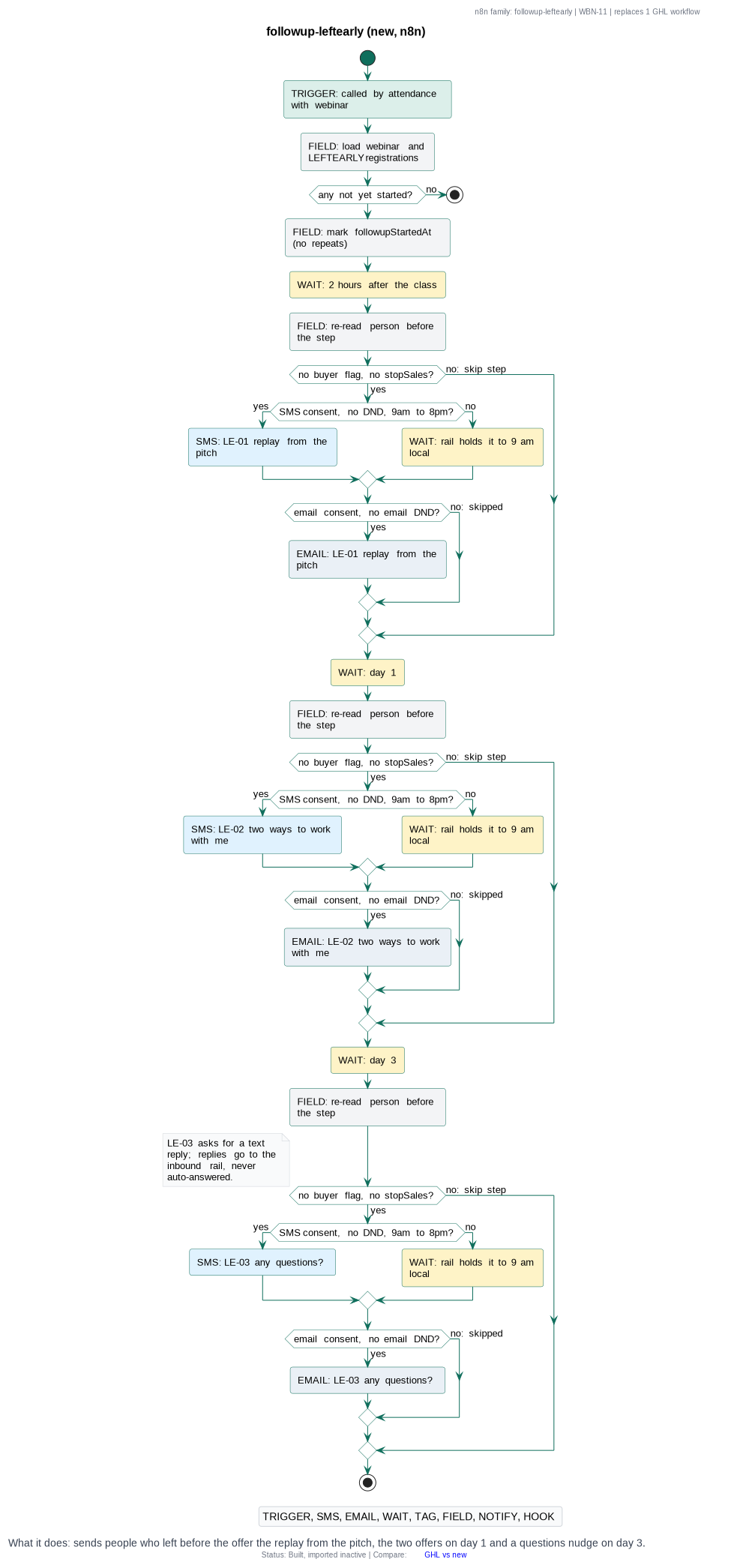
Left-early follow-up
Sends people who left before the offer the replay starting at the offer, then the two programs, then a nudge to ask questions.
- When it runs
- The same day, then day 1 and day 3 at 10 am Eastern. It stops the moment the person buys.
- What it sends
- Texts and emails, each only where the person agreed. Wording waits on your sign-off.
- Switched on by
- Your go to switch sends on.
- Replaces
- Nothing did this in GoHighLevel. It borrows the structure of "4. Follow Up Sequence No Purchase".
Open full size -
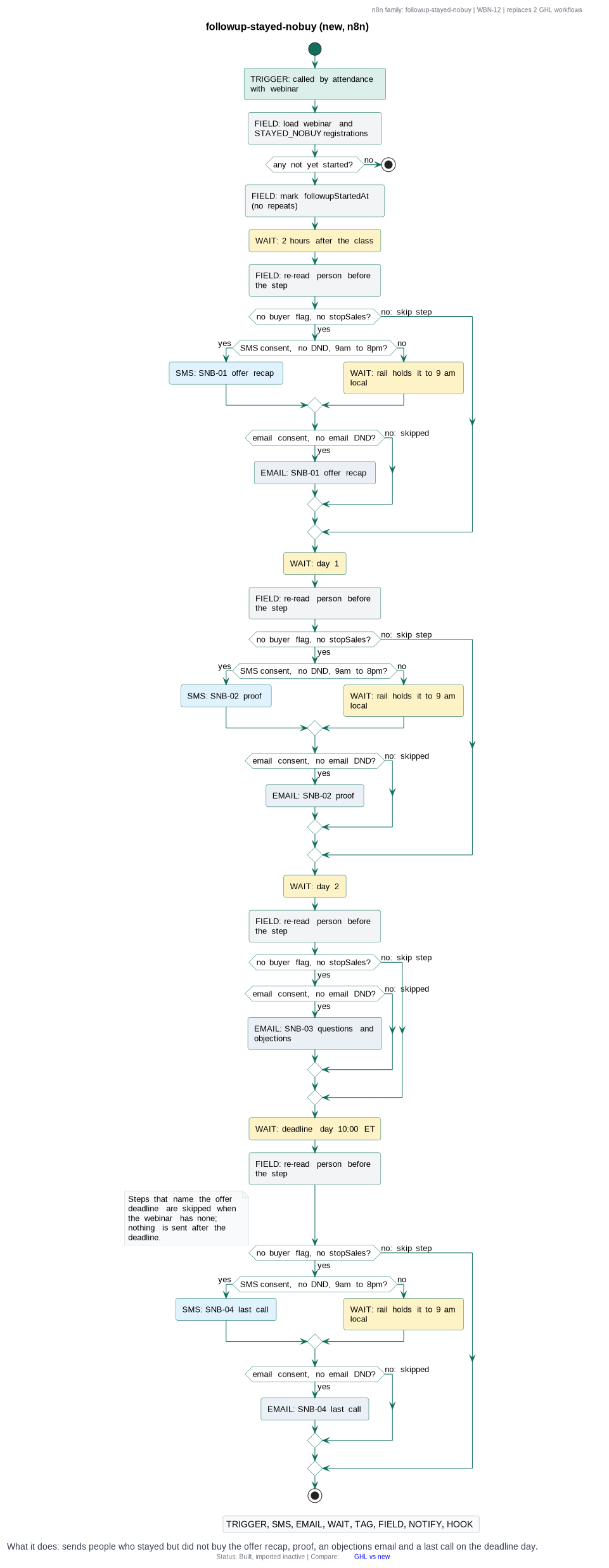
Stayed, didn't buy
Sends people who stayed but did not buy an offer recap, results, answers to the usual questions, and a last call on the deadline day.
- When it runs
- The same day, then day 1 and day 2 at 10 am Eastern, and the morning of the offer deadline. It stops the moment the person buys.
- What it sends
- Texts and emails, each only where the person agreed. Wording waits on your sign-off, and member results are used only with their written OK.
- Switched on by
- Your go to switch sends on, and a real offer deadline for each webinar.
- Replaces
- Both copies of "4. Follow Up Sequence No Purchase" (their emails are blank today), rebuilt.
Open full size -
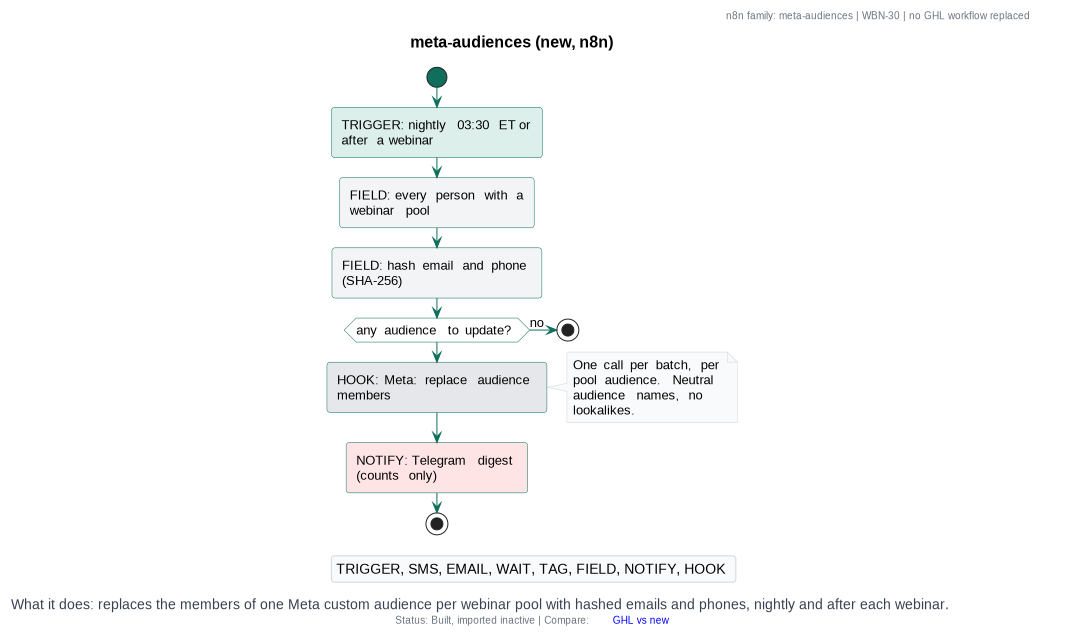
Meta audiences
Keeps one Meta custom audience per pool up to date in your ad account, so your ads can reach or leave out each group.
- When it runs
- Every night at 3:30 am Eastern, and right after each webinar's attendance is sorted.
- What it sends
- Sends nothing to anyone. Emails and phones go to Meta scrambled (hashed), as Meta requires, and audience names stay neutral.
- Switched on by
- Access to your Meta ad account.
- Replaces
- Nothing. GoHighLevel did not do this.
Open full size
Sales and buyers
Payments, product delivery and the welcome for new buyers.
-
Payments and payment plans
Records every Stripe payment as an order on the contact, marks them as a buyer, takes them out of sales messages, confirms the purchase and reminds payment-plan buyers before each payment.
- When it runs
- The moment Stripe reports a payment or a declined card. Plan reminders are checked every day at 10 am Eastern.
- What it sends
- The purchase confirmation, payment-plan reminders and a note when a card is declined, by text and email. Wording waits on your sign-off.
- Switched on by
- Your read-only Stripe key for the quiet run, and the new Stripe Payment Links made with you. Confirmations switch on only after the last old installment charge on October 29, so no buyer gets two.
- Replaces
- All rebuilt: "ONE-TIME PAYMENT MENTORSHIP PAYMENT", "TWO-TIME PAYMENT MENTORSHIP PAYMENT", "THREE-TIME PAYMENT MENTORSHIP PAYMENT", "Reminders : 3 Time Payment" and "PURCHASED REINVENTED MENTORSHIP".
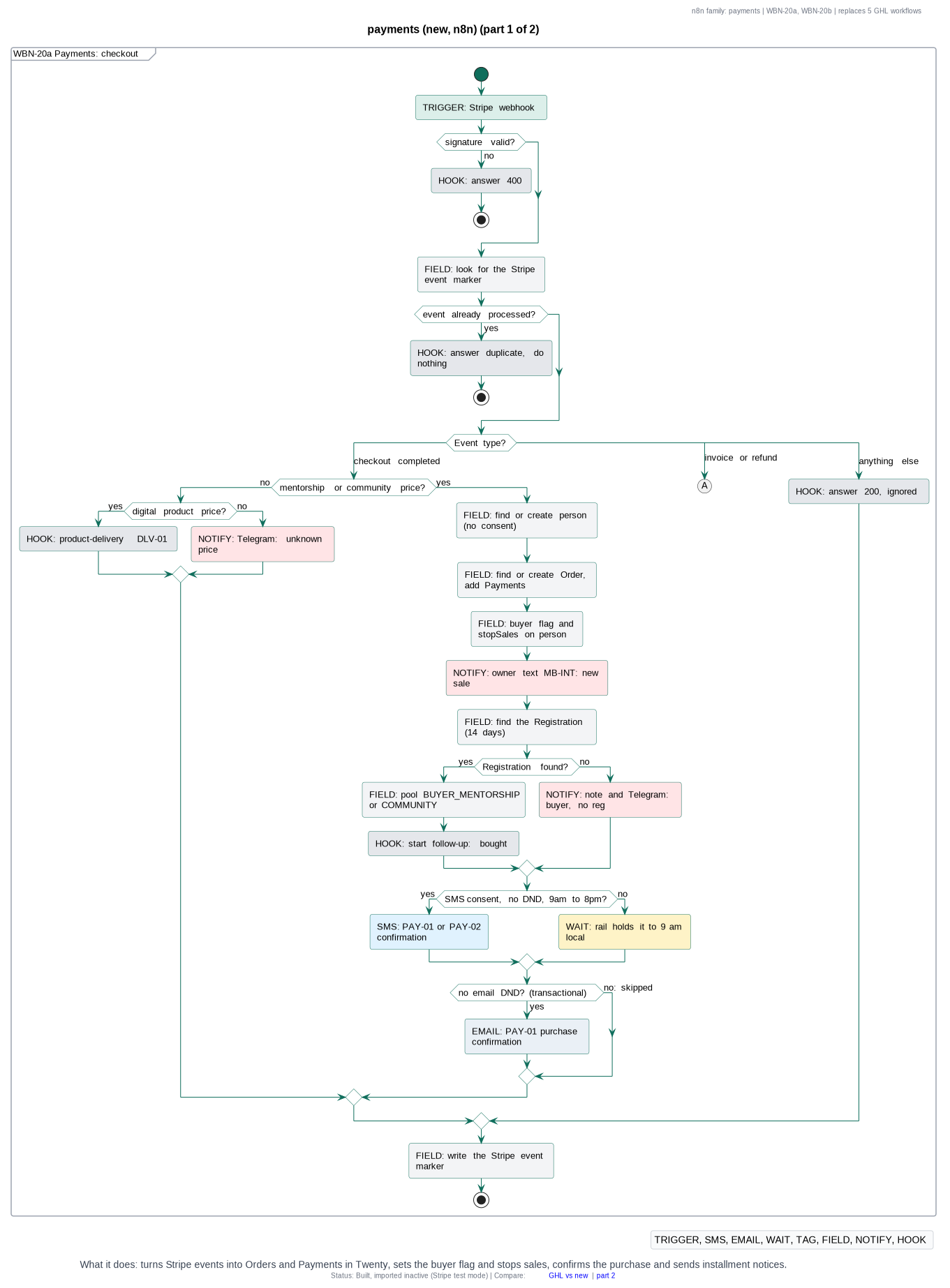
Part 1. Open full size 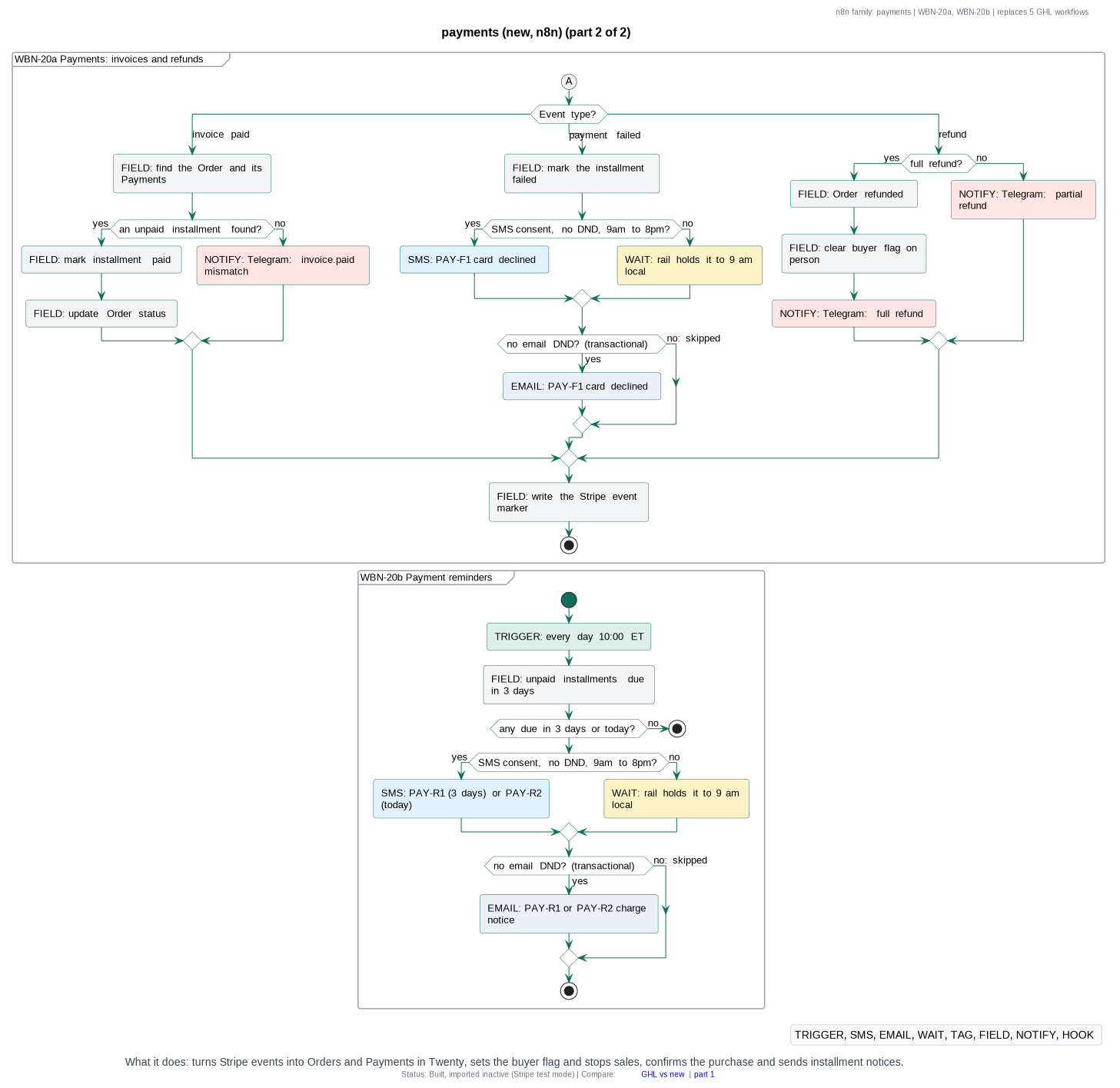
Part 2. Open full size -
Product delivery
Delivers a paid digital product (the Bank Audit, the ebooks and bundles) by email, and lets you know about the sale.
- When it runs
- Right after Stripe reports the purchase. It runs once per checkout, so nobody gets the file twice.
- What it sends
- The delivery email with the file, and a text where the buyer agreed. Wording waits on your sign-off.
- Switched on by
- Each product separately, once its Stripe price and its file are set. For the Bank Audit: the ebook file and its $27 Payment Link.
- Replaces
- "BANK AUDIT" and "MS EBOOK", marked retired in the first map and now covered here.
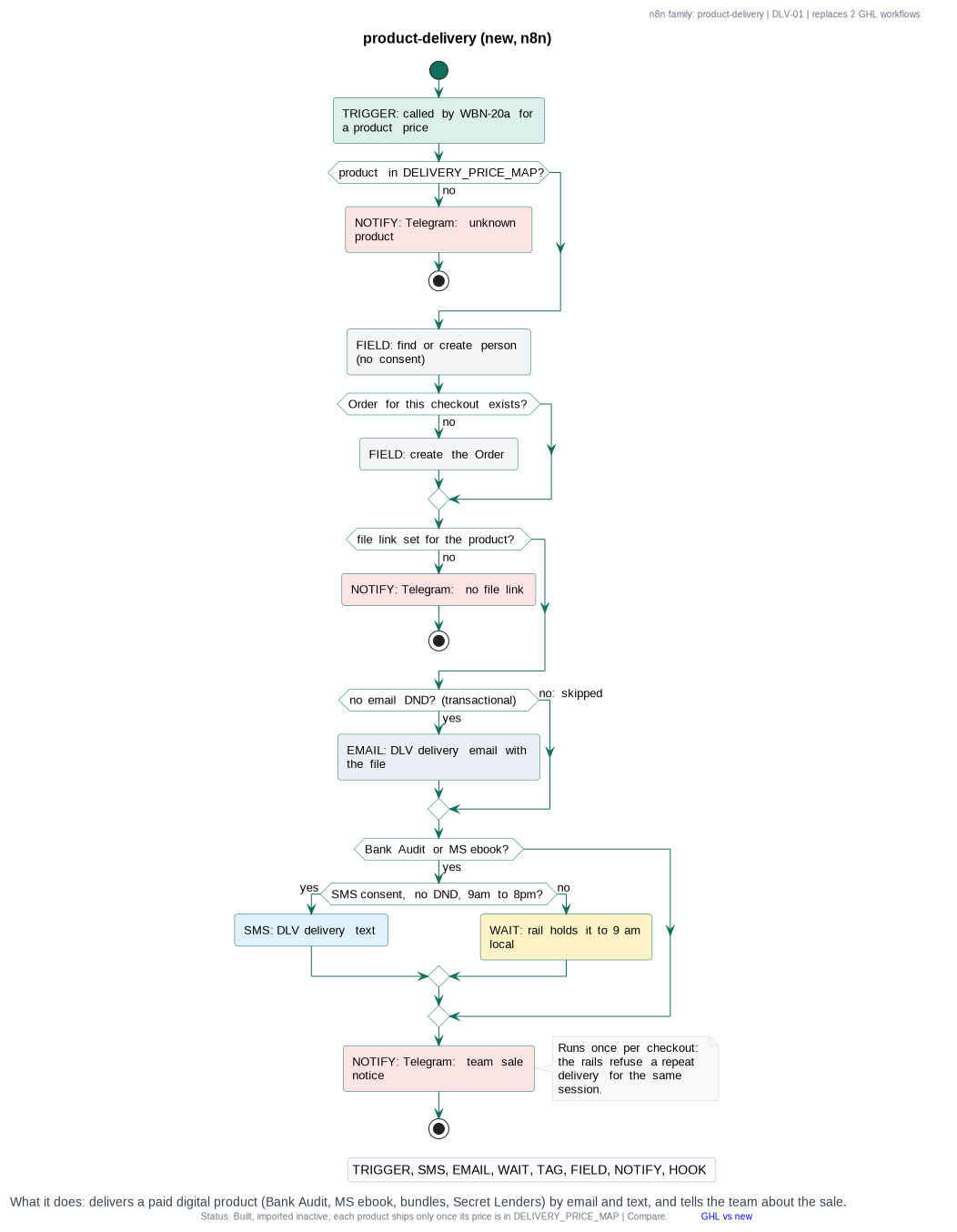
Open full size -
Skool buyers
Marks new paid Skool members as community buyers, stops sales texts to them and hands them to the buyer welcome.
- When it runs
- Every Monday at 8 am Eastern, from your Skool member export.
- What it sends
- Sends nothing itself. The buyer welcome below sends the messages.
- Switched on by
- The weekly Skool member export (Skool's Members page, Export).
- Replaces
- "Text : Join Skool", rebuilt.
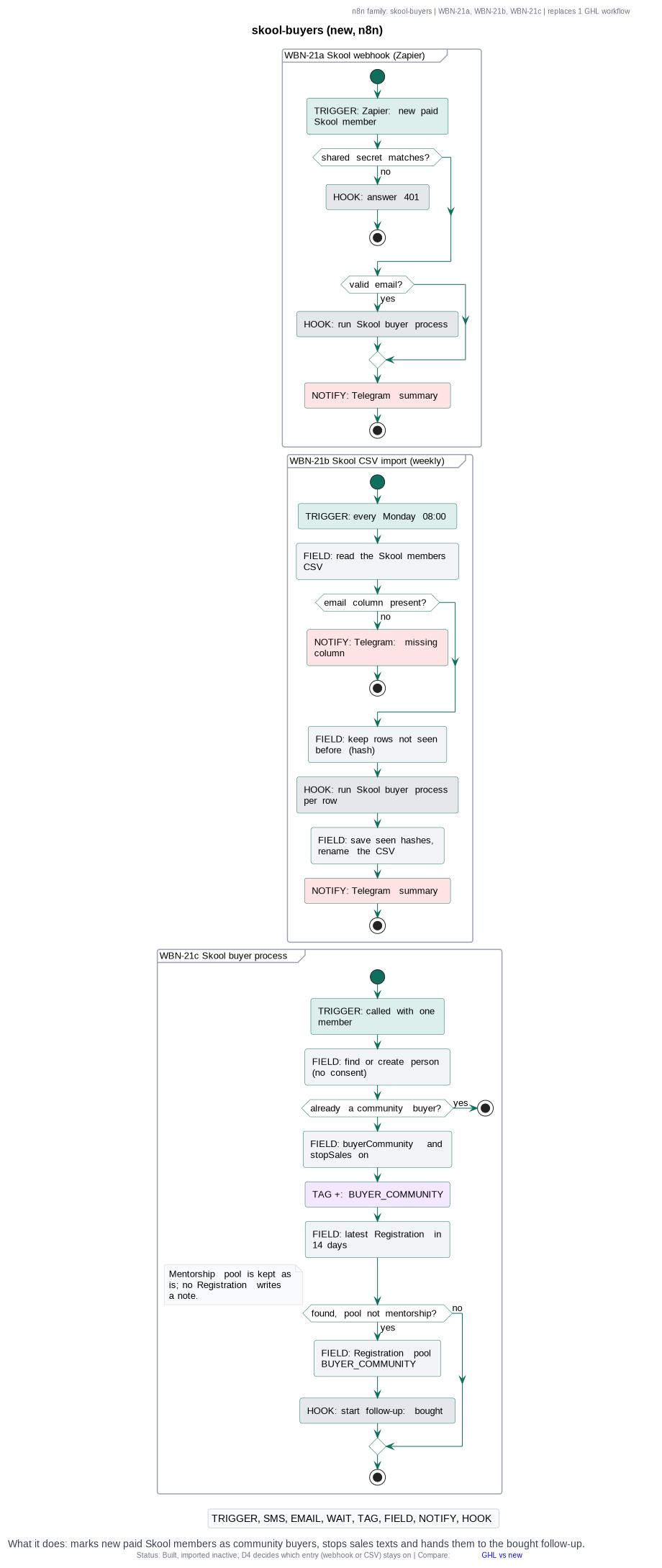
Open full size -
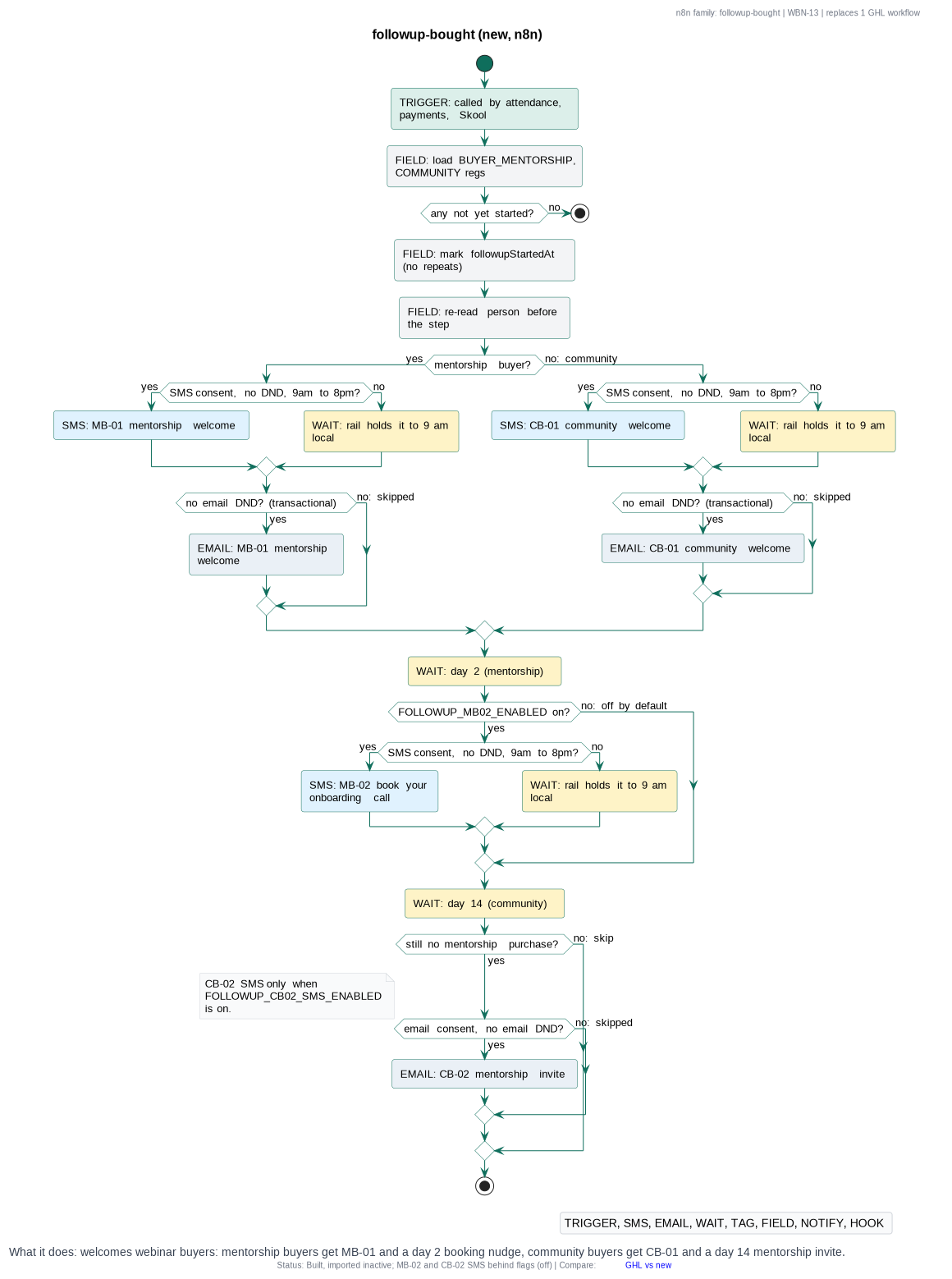
Buyer welcome
Welcomes new buyers. Mentorship buyers get a welcome and a nudge to book their first call. Community buyers get a welcome and, two weeks in, an invite to the mentorship.
- When it runs
- As soon as the purchase is recorded, then day 2 (mentorship) or day 14 (community) at 10 am Eastern.
- What it sends
- Welcome texts and emails. The day 2 booking text stays off until you pick a booking tool, and the day 14 text stays off unless you turn it on (the email goes either way). Wording waits on your sign-off.
- Switched on by
- Your go to switch sends on, and your booking tool for the day 2 step.
- Replaces
- "PURCHASED REINVENTED MENTORSHIP" (which points at an old booking link), rebuilt.
Open full size
Leads and keywords
Forms, lead ads, keyword texts and the longer campaigns.
-
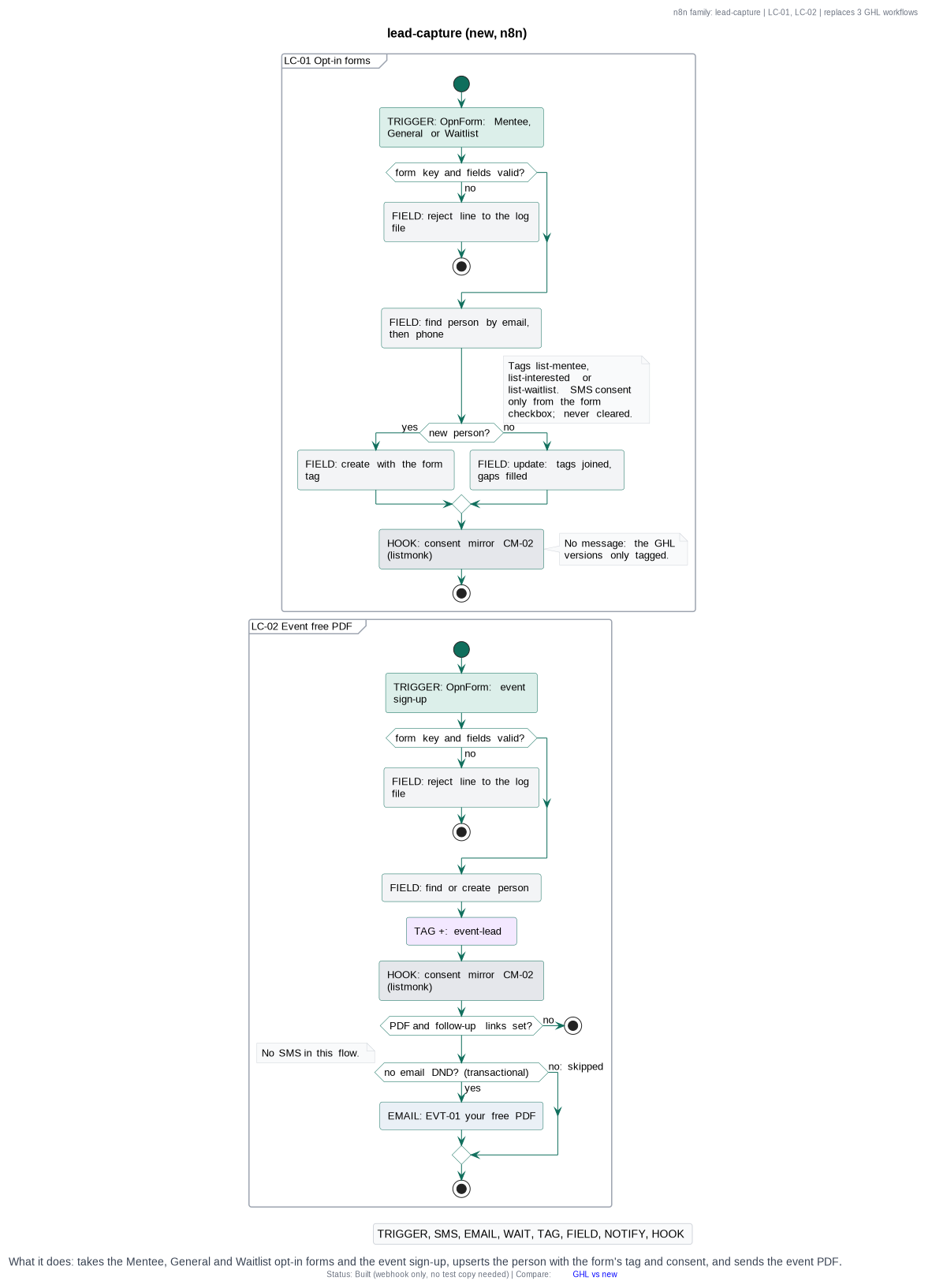
Opt-in forms and the mentorship application
Takes the Mentee, General and Waitlist opt-in forms, the event sign-up and the mentorship application, and adds or updates the person with the right tag and only the consent they gave.
- When it runs
- The moment a form is sent.
- What it sends
- The free event PDF by email. For the mentorship application it records the answers and sends nothing yet. Wording waits on your sign-off.
- Switched on by
- Your forms pointed at it. The application's next step waits on two answers: whether to put the mentorship behind an application, and your booking tool.
- Replaces
- "Add tag: Mentee", "Add tag; Interested contact" and "Event (Lead Gen)", which the first map listed as missing and are now covered.
Open full size -
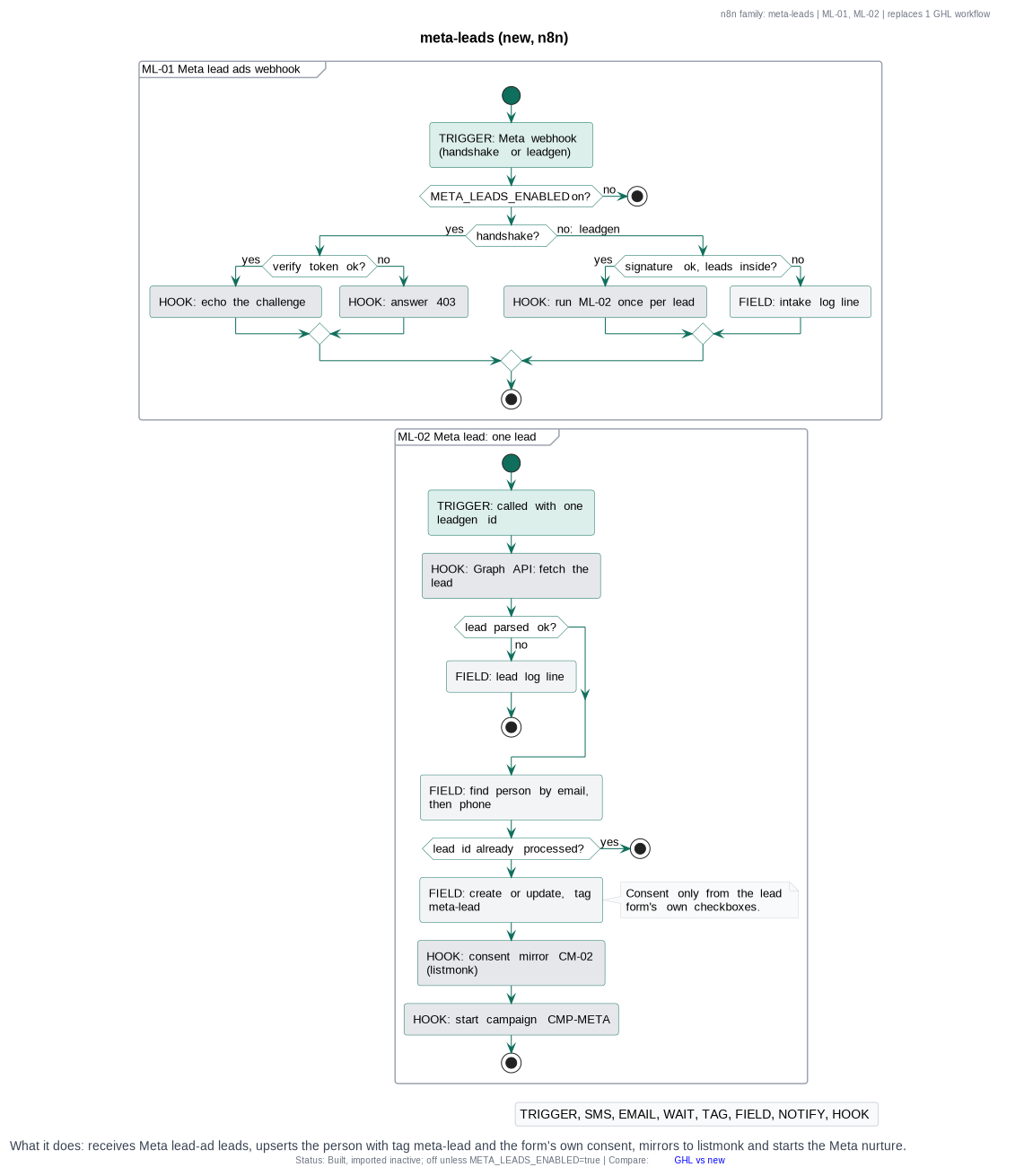
Meta lead ads
Receives leads from your Meta lead ads, adds the person with only the consent their form gave, and starts a short nurture.
- When it runs
- The moment Meta sends a lead.
- What it sends
- Sends nothing itself. It starts the 3 day lead nurture under Campaigns.
- Switched on by
- Off until you tell us the lead ad is running and say go.
- Replaces
- "Facebook Lead Tagging", which the first map listed as missing.
Open full size -
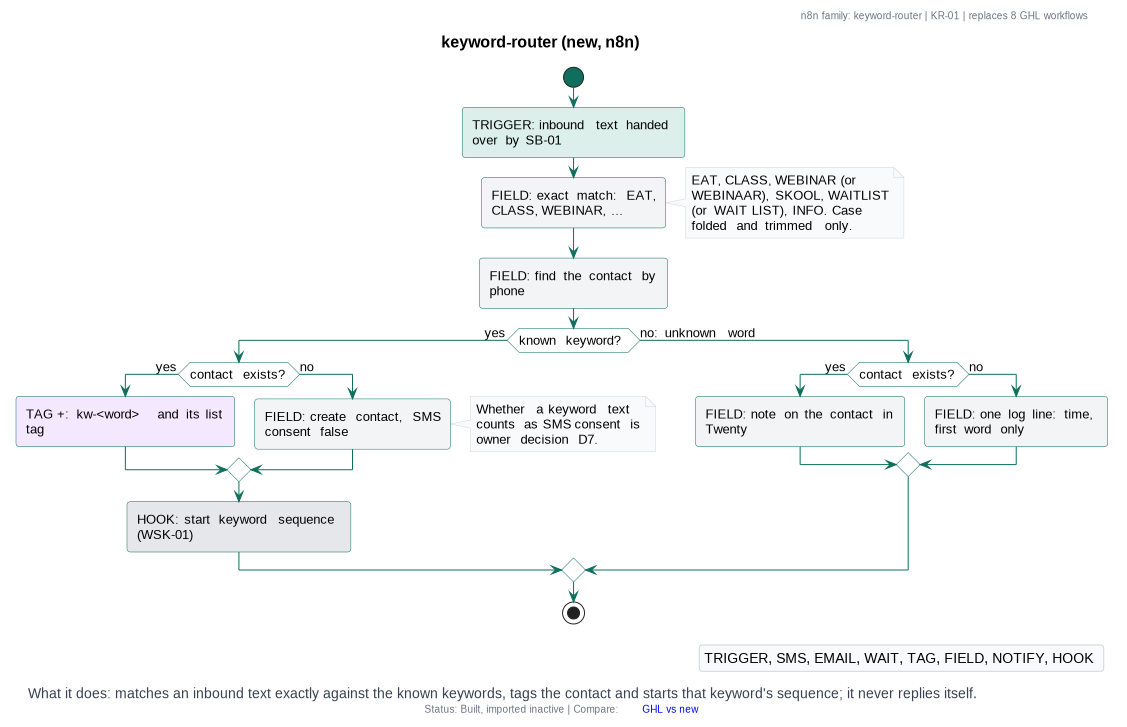
Keyword texts
Matches a text to the 864 number exactly against your keywords (EAT, CLASS, WEBINAR, SKOOL, WAITLIST, INFO and MENTEE), tags the contact and starts that keyword's messages. Words it does not know are saved in a list for you.
- When it runs
- Every time a text comes in that is not STOP, HELP or START.
- What it sends
- Sends nothing itself and never replies on its own. Keyword replies below do the sending.
- Switched on by
- The 864 number moved and the texting registration approved.
- Replaces
- All rebuilt: "General optin workflow", "Texted Webinar - Nurture to Webinar Registration", "EAT", "Mastery: Email Free List", "Mastery: Get Info", "Texted 'Class' webinar' list': Register for Webinar", "Texted 'Skool': Send Reminders to join credit Mastery" and "WAITLIST".
Open full size -
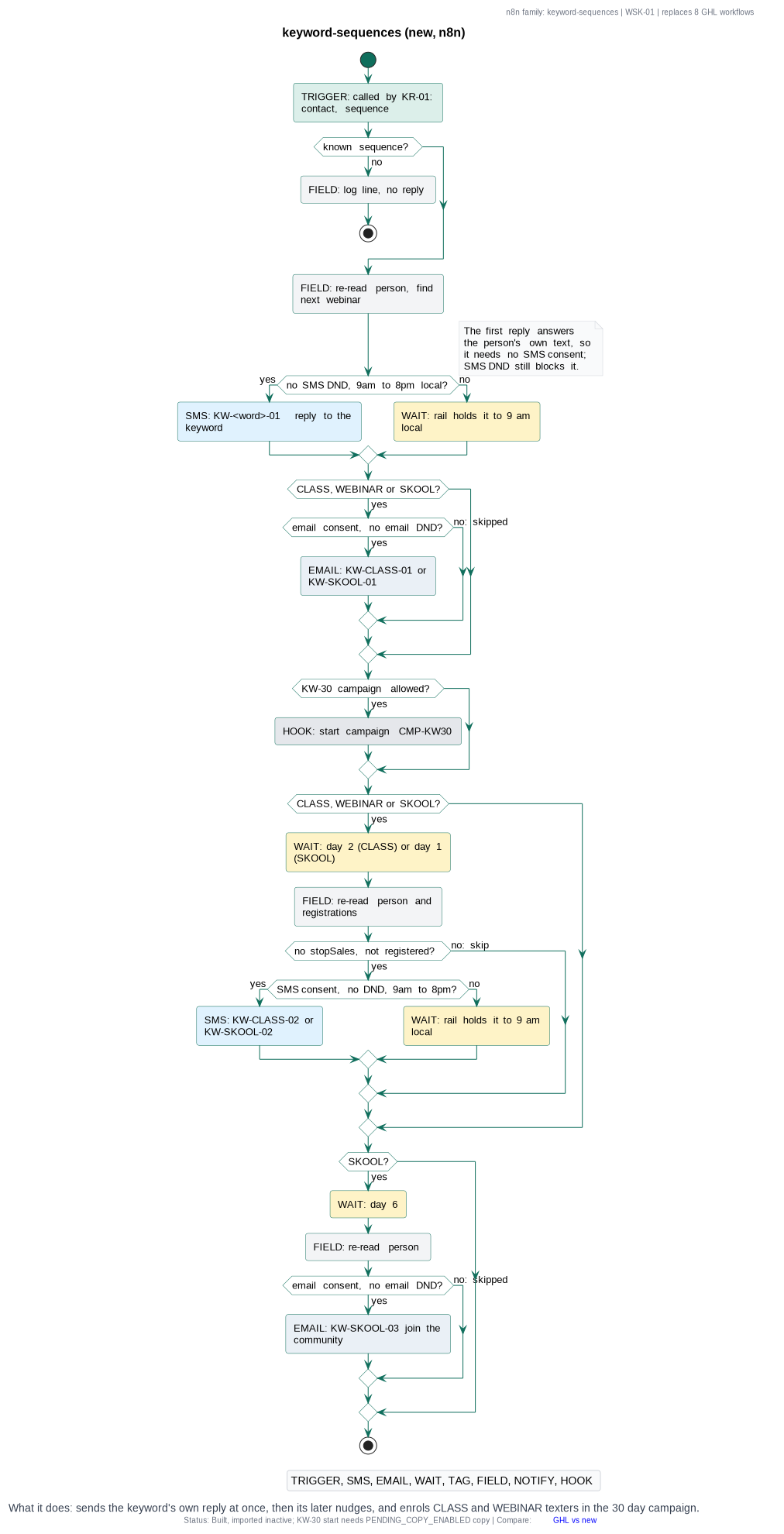
Keyword replies
Sends each keyword's own reply at once, then its later nudges, and enrolls keyword texters in the 30 day webinar campaign.
- When it runs
- Right after Keyword texts matches a word, then on each nudge's day.
- What it sends
- Texts and emails. A keyword text alone is not permission for marketing texts. Wording waits on your sign-off.
- Switched on by
- The 864 number moved and the texting registration approved, then your go.
- Replaces
- The same 8 keyword workflows as Keyword texts; the two share the work.
Open full size -
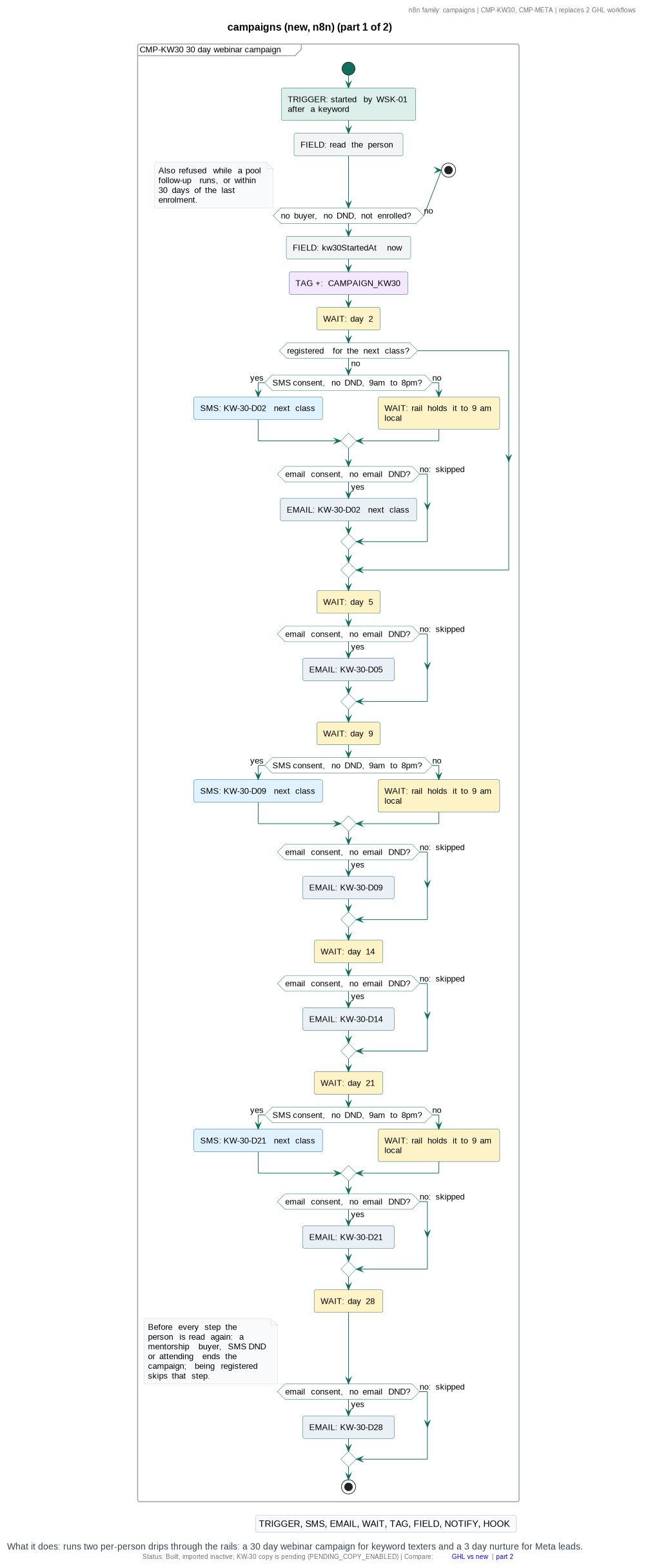
Campaigns
Runs two longer campaigns, one person at a time: the 30 day webinar campaign for keyword texters (it ends if they buy the mentorship), and a 3 day nurture for Meta leads.
- When it runs
- From the day a person enters, on the campaign's own schedule.
- What it sends
- Texts and emails, each only where the person agreed. The 30 day campaign carries the most wording that waits on your sign-off.
- Switched on by
- Copy sign-off and your go. The Meta nurture also needs Meta lead ads switched on.
- Replaces
- "Texted Webinar - Nurture to Webinar Registration" (rebuilt) and "Facebook Lead Tagging" (listed as missing).
Part 1. Open full size 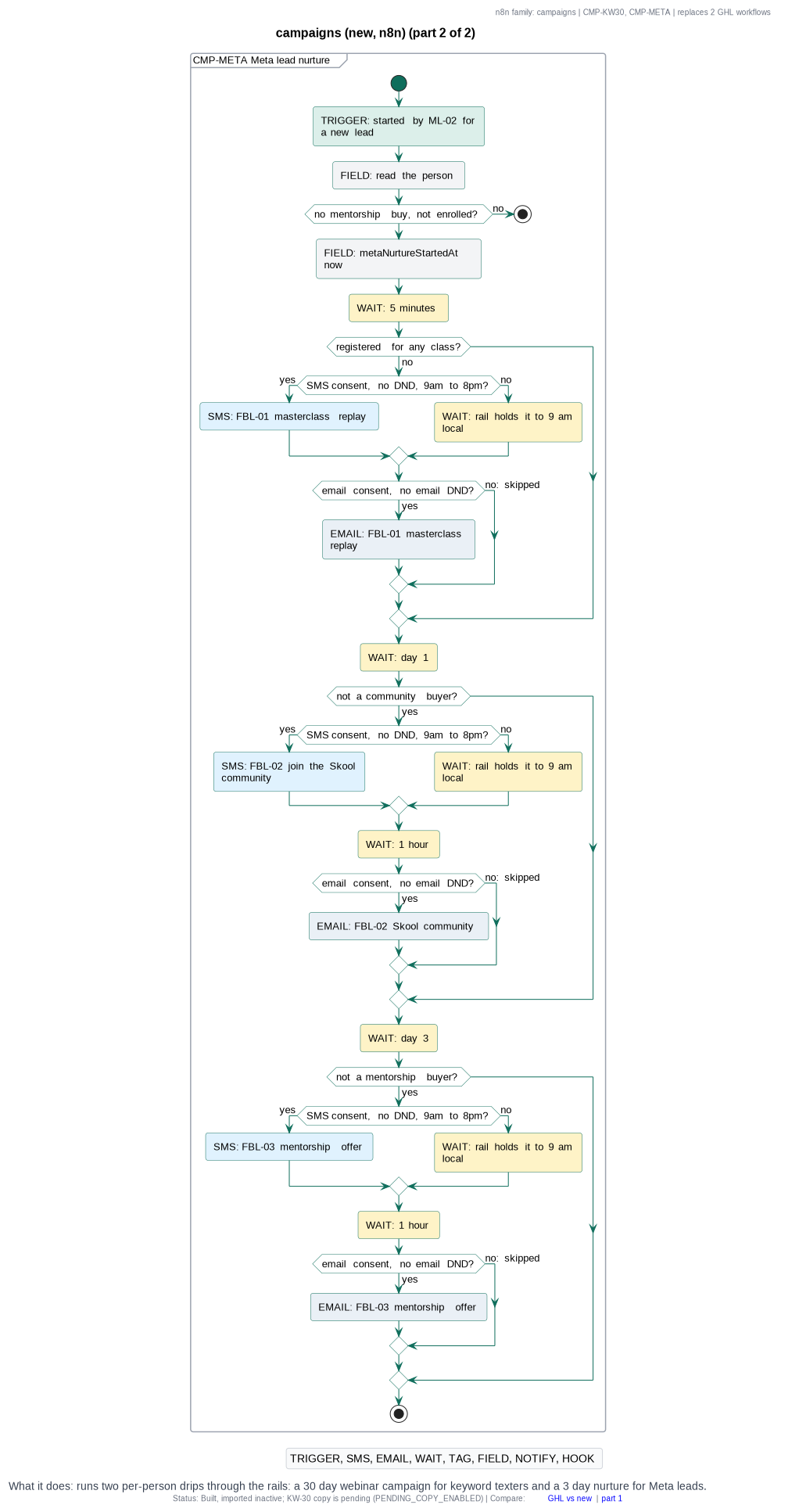
Part 2. Open full size -
Instagram comment replies
When someone comments your keyword (for example CLASS) on the Instagram post you choose, sends them one private reply.
- When it runs
- The moment Instagram reports a new top-level comment on that post, and only within set hours.
- What it sends
- One fixed private reply per commenter, never a sequence.
- Switched on by
- Your answer on what replies to "Comment CLASS" today and whether this should take over, the post you pick, the reply wording, and your go. Off until then.
- Replaces
- Whatever answers "Comment CLASS" today, once you tell us what it is.
Skool members
Keeping members, from your round-one answers about declined cards and quiet members.
-
Declined cards and cancellations
Emails a member whose card was declined, with how to update it, and sends a plain confirmation to a member who is cancelling. A save offer never stands in the way of cancelling.
- When it runs
- Every day at 10 am Eastern, from your Skool member status. At most one email per member every 7 days.
- What it sends
- One email. No texts. Wording waits on your sign-off.
- Switched on by
- Your Skool member exports and your approval. It runs in quiet mode only until then.
- Replaces
- Nothing. GoHighLevel did not do this.
-
Quiet members
Emails active members who have not been in the group for more than 30 days, to bring them back in.
- When it runs
- Every Tuesday at 10 am Eastern. At most one email per member every 60 days.
- What it sends
- One email, only to members who agreed to email. No texts. Wording waits on your sign-off.
- Switched on by
- Your Skool member exports and your approval. It runs in quiet mode only until then.
- Replaces
- Nothing. GoHighLevel did not do this.
Safety and running
The pieces that keep every message legal, every list in step and the whole system watched.
-
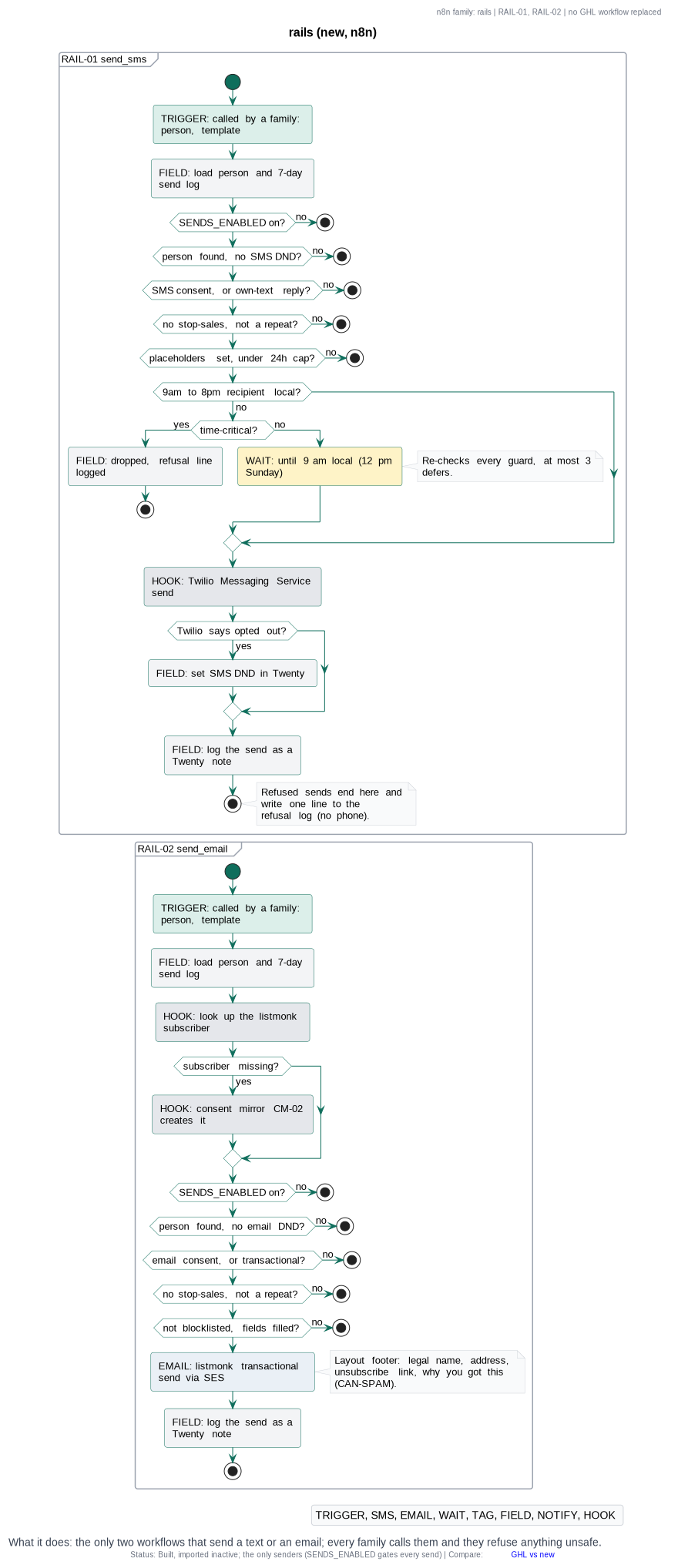
The two senders
The only two workflows that can send a text or an email. Every other automation goes through them, and they refuse anything unsafe.
- When it runs
- Whenever another automation asks to send.
- What it sends
- Every text and email, once sends are on. Before each one it checks consent, do-not-contact flags, quiet hours in the person's time zone, the limit of 3 marketing texts a day, and that nobody gets the same message twice.
- Switched on by
- Your go: this is the one main switch for all sends. Texts also need the 864 number moved and the texting registration approved.
- Replaces
- Nothing directly. In GoHighLevel each workflow sent on its own.
Open full size -
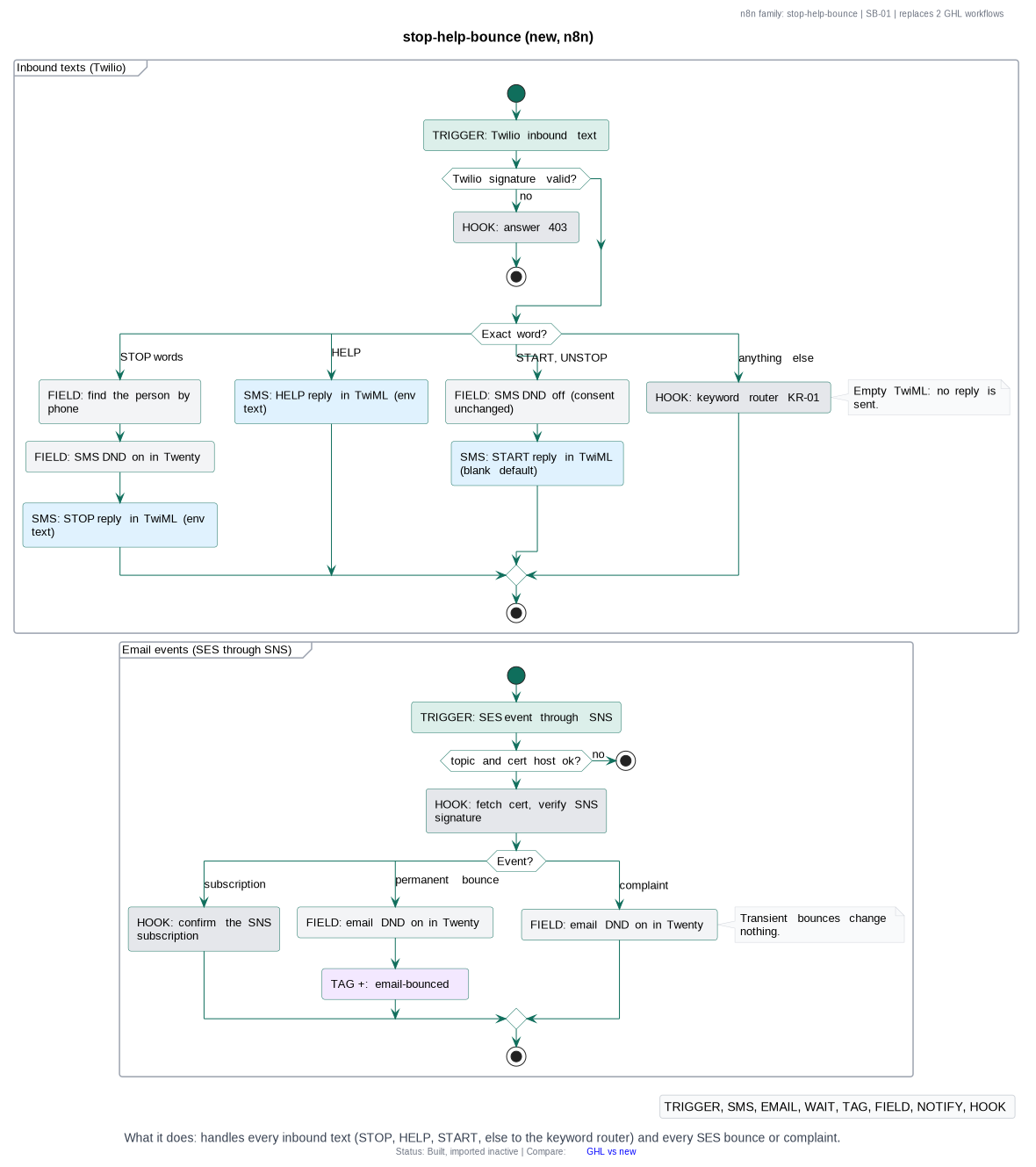
STOP, HELP and bounces
Handles every incoming text and every bounced email. STOP, and plain replies like "stop texting me", turn texting off for that person at once. HELP gets the help reply. START turns texting back on.
- When it runs
- The moment a text comes in or an email bounces, before any other message can go out.
- What it sends
- The one-line STOP confirmation and the HELP reply. Wording waits on your sign-off. Unclear replies that mention stopping are flagged to you.
- Switched on by
- It is the first thing on when sends switch on.
- Replaces
- "REPLY : STOP" (which appears to switch texting back on) and "Email Bounced clean up", rebuilt.
Open full size -
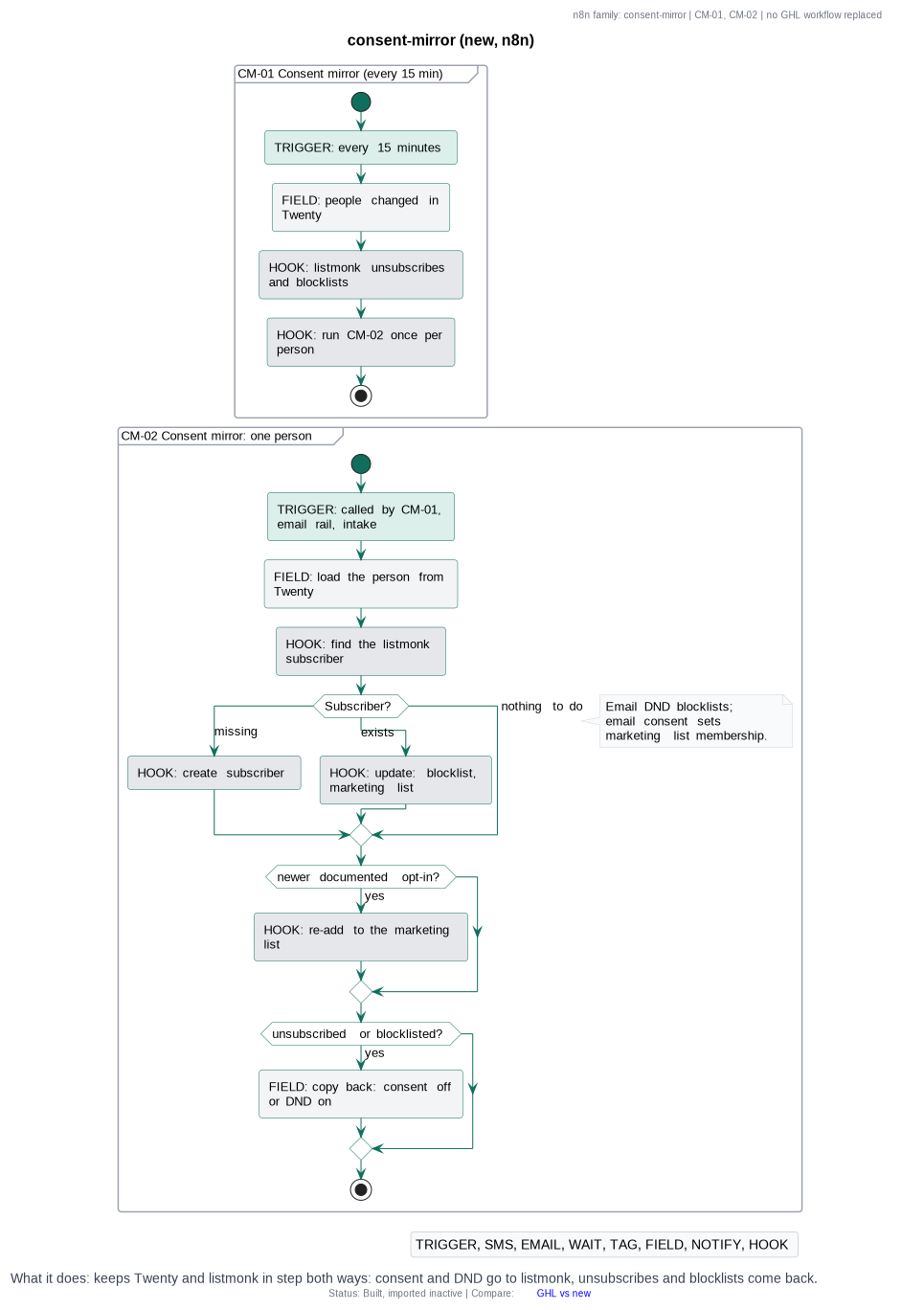
Consent in step
Keeps your contacts and your email lists in step both ways: consent and do-not-contact flags go to the email lists, and unsubscribes come back to the contact.
- When it runs
- Every 15 minutes, and for one person whenever they change.
- What it sends
- Sends nothing to anyone.
- Switched on by
- Nothing from you. It runs with email.
- Replaces
- Nothing. GoHighLevel kept contacts and email lists in one place.
Open full size -
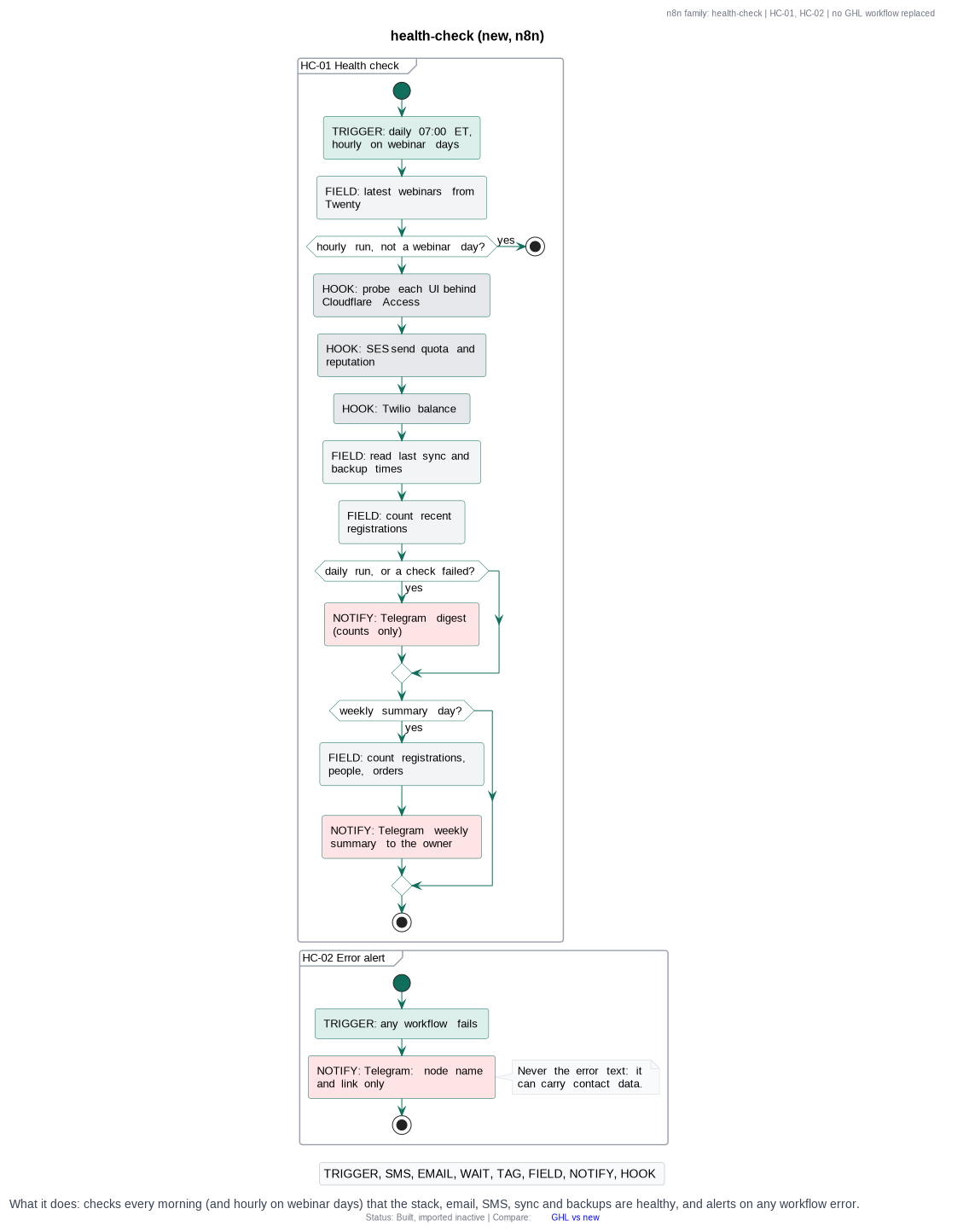
Daily health check
Confirms every piece is running: email and texting are healthy, attendance is up to date, the nightly backup ran and the next webinar is set. Any automation that fails alerts us.
- When it runs
- Every morning at 7 am Eastern, and every hour on webinar days.
- What it sends
- A daily result to us, and a short weekly summary to you (Monday unless you choose otherwise): sign-ups, new contacts and new orders.
- Switched on by
- Nothing from you. It runs from day one.
- Replaces
- Nothing. Nothing watches GoHighLevel for you today.
Open full size -
Quiet-run readers
During the quiet run, reads your Zoom registrants and attendance, your Stripe payments and your ClickFunnels sign-ups, and hands each new one to the right automation as if it had arrived live.
- When it runs
- Every 15 minutes (ClickFunnels every hour), and only while sends are off. It refuses to run once sends are on.
- What it sends
- Sends nothing, and never changes anything in your Zoom, Stripe or ClickFunnels accounts. It only reads.
- Switched on by
- Your read-only keys. At go-live your tools report to the new system directly, and these readers retire.
- Replaces
- Nothing. They exist only for the quiet run.
Held for your decision
-
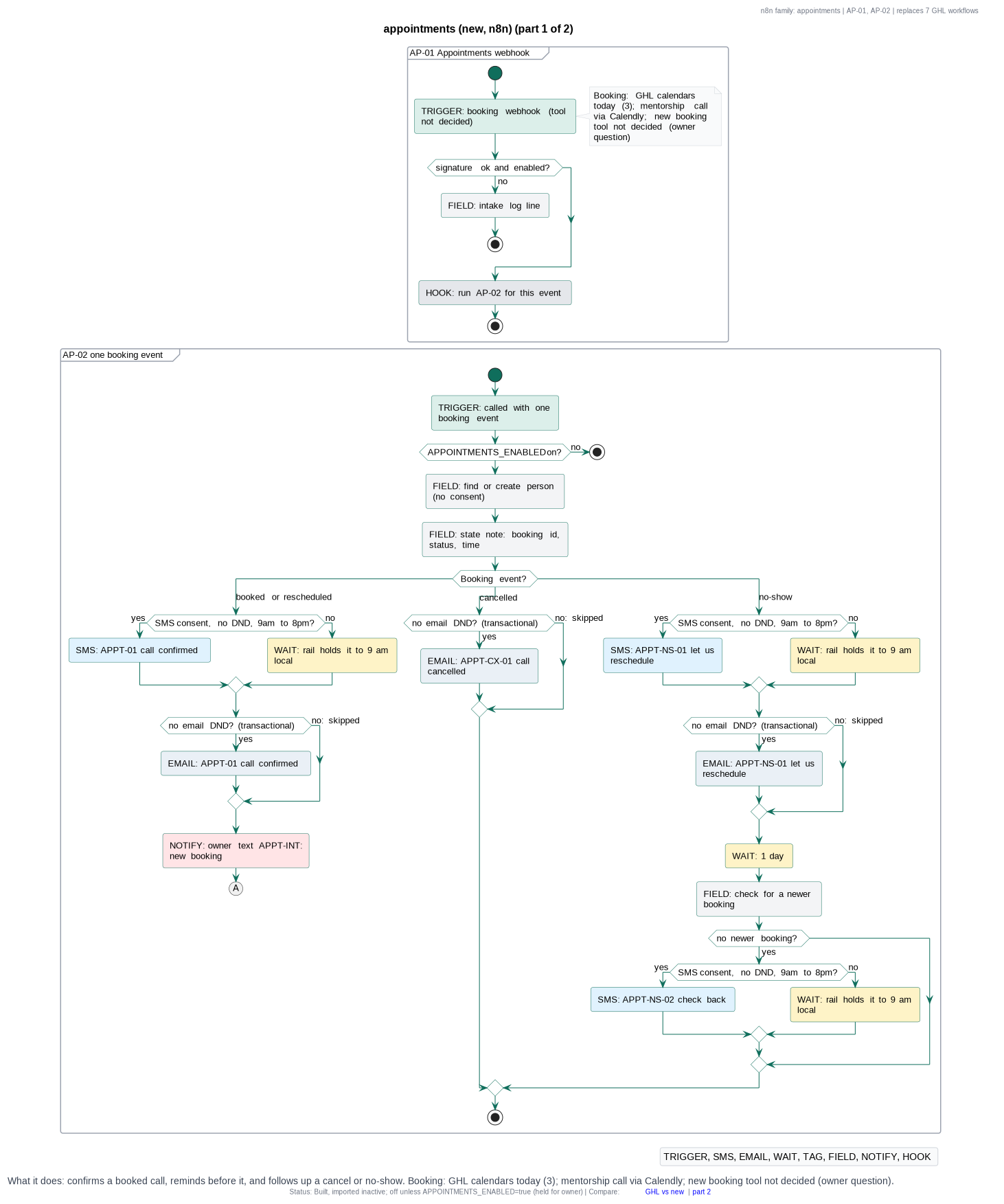
Booked calls
replaces 7, offConfirms a booked call, reminds before it, and follows up a cancellation or a no-show.
- When it runs
- When your booking tool reports a booking, a cancellation or a no-show.
- What it sends
- Confirmation, reminder and reschedule texts and emails. Wording waits on your sign-off.
- Switched on by
- Your pick of a booking tool. Off until then, and no message carries a booking link.
- Replaces
- Held: "Appt Confirmation + Reminder - Funding Consultation", "Appt Confirmation + Reminders- Funnding Onboarding", "Appt Confirmation + Reminders- Reinvented Mentorship", "No-Show Nurture", the two "Reinvented Mentorship Call" workflows and "10. Appointment Cancelled".
Part 1. Open full size 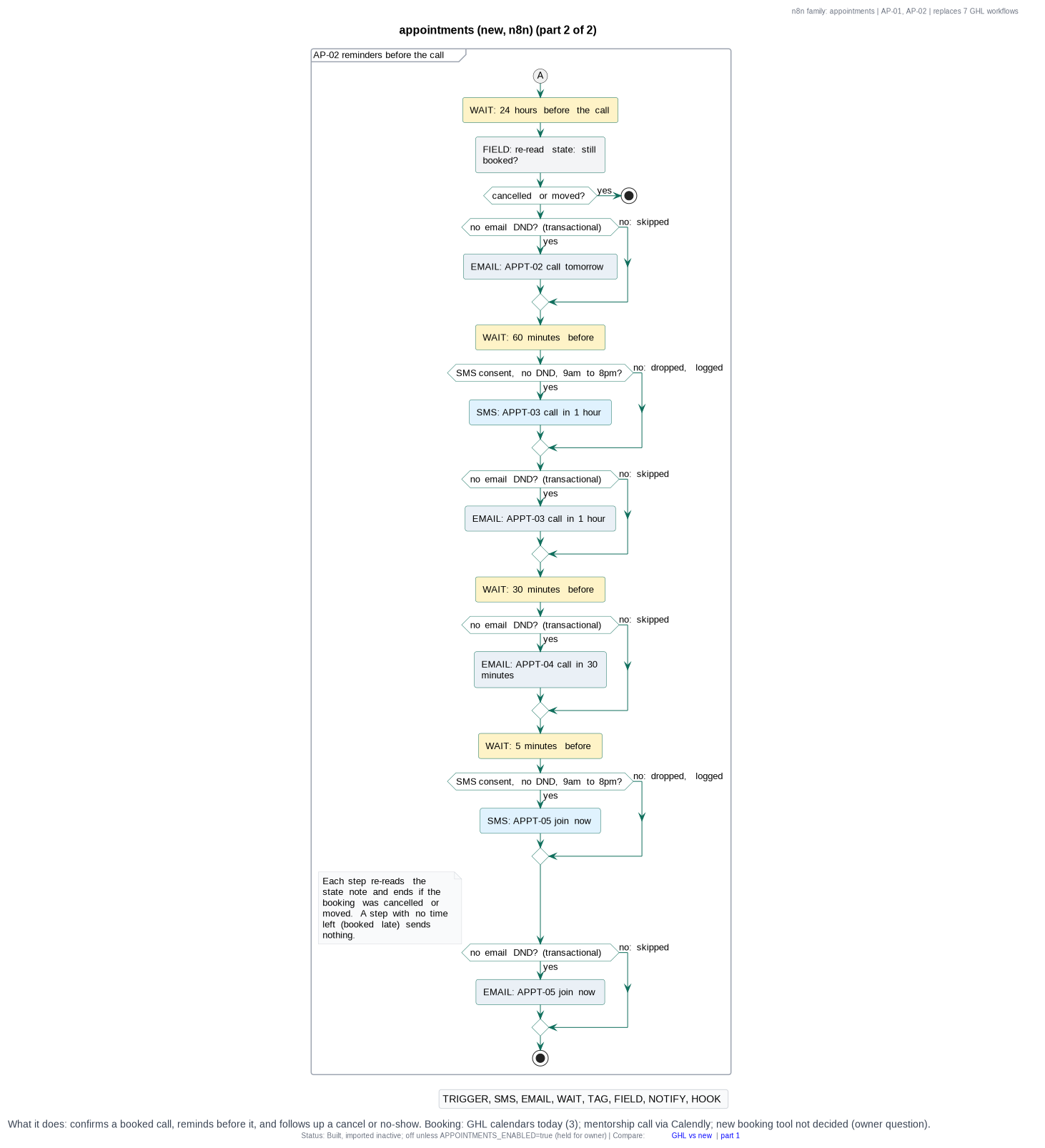
Part 2. Open full size -
Funding program
heldNot built. Its messages, workflows and pages stay off until your counsel reviews the program. The questions for them are on the Package page.
-
Retired
Five old product funnels whose pages and products no longer exist, and six "clicked the link" tags that real attendance replaces. Nothing is deleted from GoHighLevel; they just are not rebuilt. The full list is on the Plan page.